

















Philippine cloud-
based, multi-branch
payroll — free to start.
Timekeeping and payroll should be affordable and simple. Run every branch from your head office, with biometric attendance flowing straight into payroll.
Paycheckmaster Go
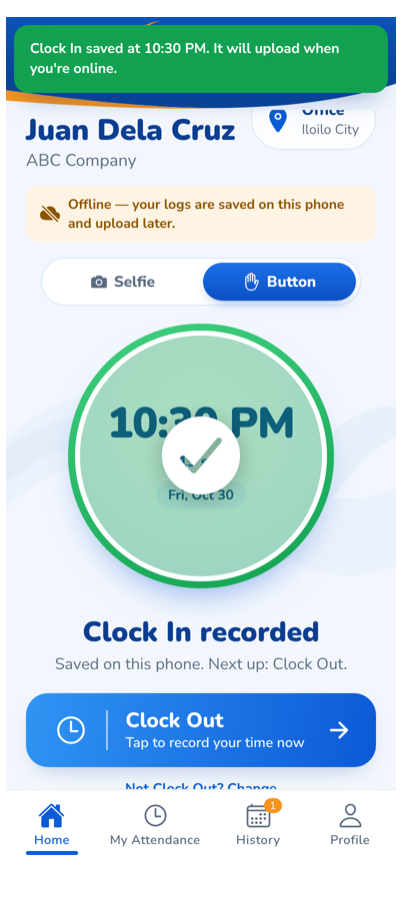
No signal? No problem. Clock in anywhere — online or offline.
Out of coverage? Every IN and OUT is stored safely on the phone.
Back online? Logs sync to PAYCHECKMASTER automatically.
Photo-verified attendance in one tap.
Every log carries its exact time and place.
Attendance history and payslips anytime.
Free for Paycheckmaster users
Cloud-Based Payroll System in the Philippines — Free for up to 10 Employees
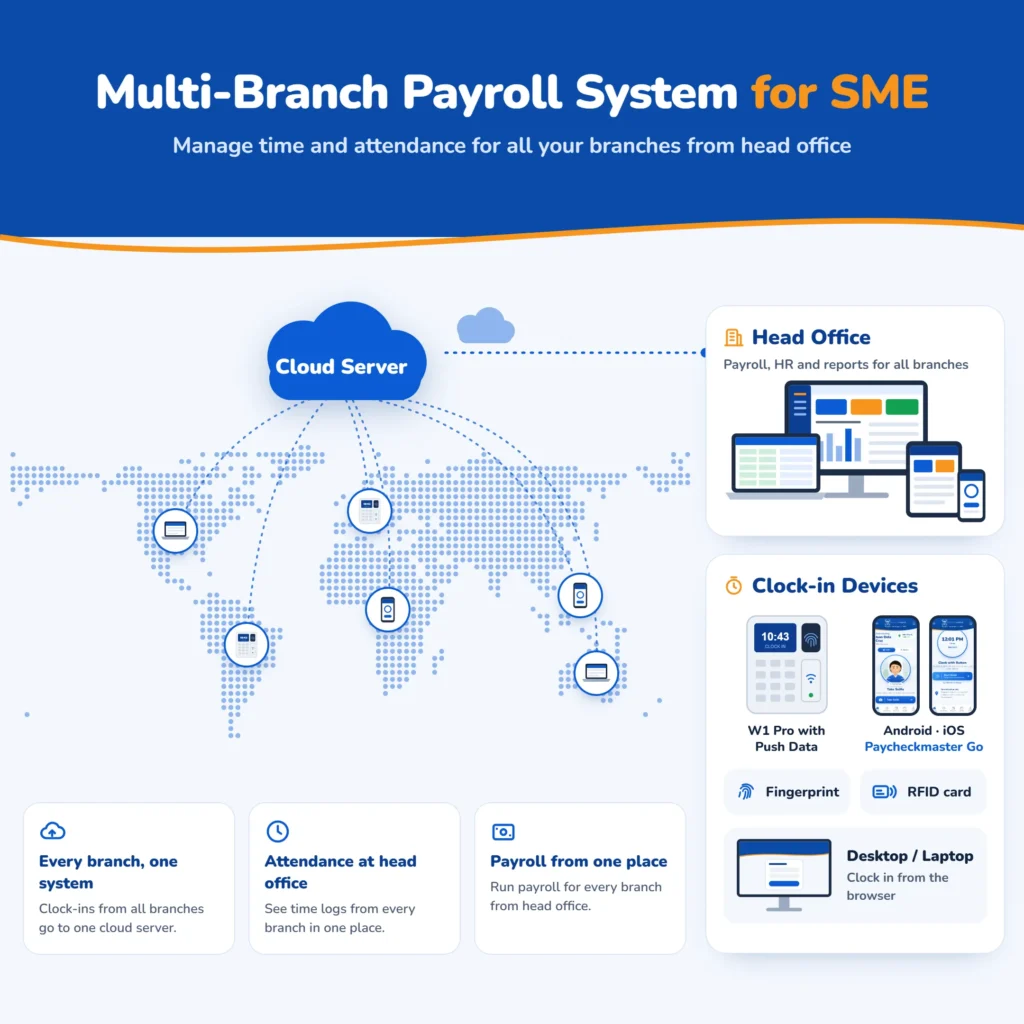
One head office. Every branch. One payroll.
Paycheckmaster is a cloud-based payroll and HR administration tool built for Philippine businesses. Your head office manages payroll for all branches, while each branch records time on its own biometric device.
Group by branch, department or project.
CSV import or real-time device link.
SSS, PhilHealth, HDMF, GSIS and tax.
Employee files, leave calendar, memos.
Two ways to run payroll
Start free. Go Pro when you grow.
Paycheckmaster Standard
Paycheckmaster Standard
Free for up to 10 employees
₱0
Payroll
HRIS
MOST COMPLETE
Paycheckmaster Pro
Monthly plan · everything in Standard, plus
from ₱300/month
Payroll
HRIS
BIR
DOLE & 13th-Month Pay
How it works
From fingerprint to payslip in four steps
01
Import or capture time logs through your biometric device.
02
Choose the cut-off
Pick the payroll period you want to process.
03
Run payroll
Deductions, loans, tax and contributions compute automatically.
04
Generate reports
Print payroll reports and payslips for every branch.
Simple monthly plans. Try it free for a month.
Free
₱0
per month · 10 Users
Nano
₱300
per month · 15 Users
Micro
₱500
per month · 30 Users
Small
₱1,200
per month · 50 Users
Medium
₱2,000
per month · 100 Users
Large
₱3,200
per month · 200 Users
Free Trial
1 month
Nano
per month · 15 Users
Micro
₱500
per month · 30 Users
Small
₱1,200
per month · 50 Users
Medium
₱2,000
per month · 100 Users
Large
₱3,200
per month · 200 Users
Who It’s For
Payroll and HR Solutions for Every Type of Business.
Whether you’re a business owner, HR manager, payroll administrator, or team leader, Paycheckmaster helps simplify payroll processing, employee attendance, and workforce management. Explore the tools that fit your role and business needs.
Different industries have different payroll requirements. A payroll solution should be flexible enough to support different employee schedules, compensation arrangements, and business structures.
Manage employee shifts, attendance, overtime, holidays, and payroll across your retail stores. Paycheckmaster brings branch attendance records together in one platform, helping HR process payroll faster without manually collecting timesheets.
Simplify timekeeping and payroll for teams working rotating and overnight shifts. Paycheckmaster helps organize attendance, overtime, night shift-related payroll, employee records, and payslips in one system.
Manage changing schedules, daily attendance, overtime, and holiday work for restaurant staff. Paycheckmaster helps restaurants and food businesses track employee time and consolidate payroll across multiple branches.
Manage employees and payroll across multiple branches from one centralized platform. With branch assignments, biometric integration, geo-fencing, and consolidated reports, Paycheckmaster gives business owners and HR teams better visibility of their workforce—whether in Iloilo, Bacolod, or anywhere in the Philippines.
Philippine Payroll Compliance
Paycheckmaster helps simplify payroll calculations and employee contributions based on applicable Philippine requirements, including BIR withholding tax, SSS, PhilHealth, and Pag-IBIG. Generate organized payroll reports and employee payslips to support your payroll documentation and reporting process.
Businesses operating in the Philippines must consider several government agencies when processing employee payroll. A reliable payroll system should help organize the necessary calculations, records, and reports.
1
Manage employee and employer SSS contributions through organized payroll records and applicable contribution schedules. Paycheckmaster helps simplify SSS-related payroll deductions and reporting.
2
Keep PhilHealth contribution records organized and include applicable employee and employer contributions in your payroll processing with Paycheckmaster.
3
4
Manage employee compensation, taxable income, and withholding tax records with Paycheckmaster. Keep payroll information organized to support your tax reporting requirements.
Why Paycheckmaster
Simplify payroll, automate timekeeping, and manage your workforce with ease.
Why Choose Paycheckmaster as Your Philippine Payroll Solution?
Choosing payroll software is an important business decision. Your payroll system should be practical, accessible, and capable of supporting your company’s operations. Here are some reasons businesses can consider Paycheckmaster:
Paycheckmaster supports payroll workflows relevant to Philippine businesses, including government contribution-related deductions and 13th-month pay processing.
Connect attendance information with payroll processing instead of maintaining separate attendance and payroll systems.
Manage employee records and attendance across different business locations.
Connect compatible biometric devices to simplify attendance recording.
Mobile and Browser Access
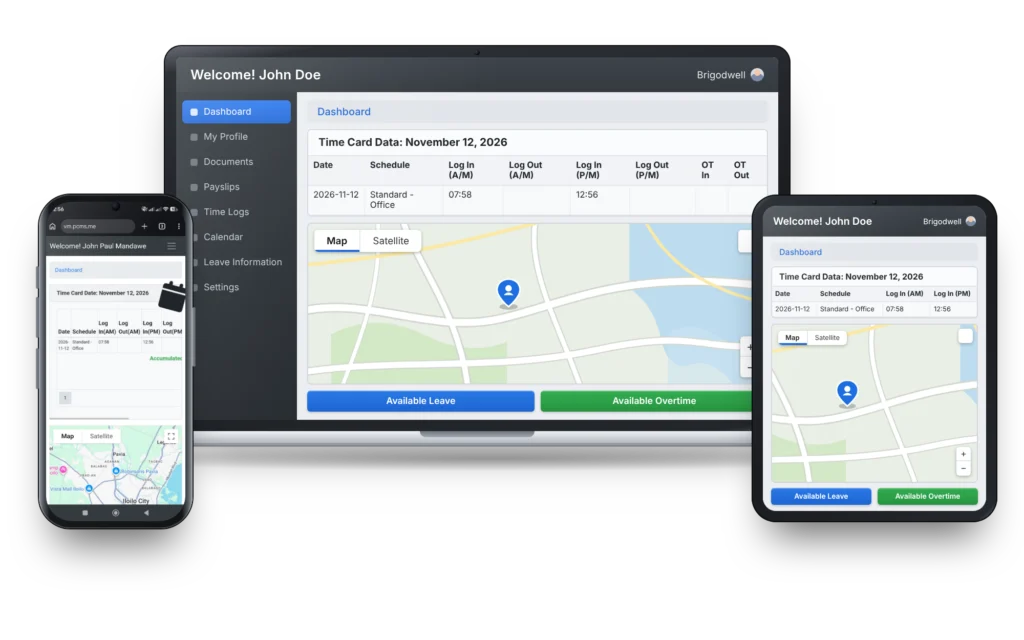
Give employees and authorized administrators access to supported features through mobile devices and web browsers.
Paycheckmaster aims to make payroll automation accessible to small and medium-sized businesses that want to move beyond spreadsheets.
Iloilo-Based, Serving Businesses Nationwide
Paycheckmaster is developed and supported in Iloilo City, Western Visayas, with services available to businesses across the Philippines. We welcome inquiries from businesses in Iloilo, Bacolod, Cebu, Manila, and other locations nationwide.
Our clients
Trusted by businesses across the Philippines
FAQ
Questions, answered
Can’t find what you need? Contact our team.
Payroll automation is the process of using software to handle repetitive payroll tasks such as attendance processing, salary computation, overtime calculations, deductions, government contributions, and payslip generation. Paycheckmaster helps businesses reduce manual work and minimize payroll errors.
Yes. Paycheckmaster automatically calculates employee salaries based on their configured basic salary, attendance records, working schedules, overtime, deductions, and other payroll settings.
Yes. Employee attendance records from supported biometric devices and mobile attendance transactions can be integrated into the payroll system for processing.
Yes. Paycheckmaster can calculate late deductions based on employee schedules and configured payroll rules, reducing the need for manual calculations.
Employees log in once with their Paycheckmaster username and password. After that, they clock in with a selfie or a single tap. The time, GPS location and work-area check are saved on the phone, then uploaded to Paycheckmaster, ready for timekeeping and payroll.
If geofencing is on for that employee, the app won’t let them clock in and tells them how far away they are. Field staff without a restriction can clock in from anywhere.
Yes. My Schedule shows a monthly calendar of shifts, rest days and holidays. My Payslips lists every cut-off’s payslip as a PDF that employees can open, save to the phone or share. My Attendance shows hours worked today and a summary of the last 7 days.
Yes. The app takes a fresh GPS reading at every clock-in and checks it against the last saved work area, so the restriction is enforced even with no signal.
Yes. Paycheckmaster provides payroll reports, including payroll summaries, employee payslips, deduction reports, and bank distribution reports.
Yes. Paycheckmaster supports Philippine statutory contribution computations for SSS, PhilHealth, and Pag-IBIG based on applicable contribution tables and employee salary information. Administrators should ensure the latest tables are configured.
Get started
Payroll that’s
affordable and simple.
Tell us about your company and we’ll set up your free trial or a demo.